One Step Retail Solutions Blog

All About Retailing Blog - This blog tackles the topic of retail technology solutions and key retail trends. One Step Retail Solutions is your one step resource for your retail technology needs.

Pages

  • About Us
  • One Step Retail Solutions Website
  • Our Favorite Retail Blogs
  • Retailer Spotlights
Showing posts with label Visuals. Show all posts

Monday, August 31, 2015

10 Types of Visual Social Media Posts That Get Shared Like Crazy


By Anna Guerrero

Do you want double your social engagement and get your content shared like crazy? For small businesses and brands everywhere, posting multiple images on social media has been proven to have massive traction. It seems simple right? But if it was so easy wouldn’t everybody do it?
 
Like most good things, in life – there’s a catch. And it isn’t not needing a huge budget or incredible graphic design skills.
 
When it comes to content creation, many people make this simple mistake: they add more visuals just for the sake of it. This is a basic approach. Smart content marketers create a visual content strategy that reaches people’s emotions – content with real psychological impact.
 
If you’re not a graphic designer or artist, don’t worry. I’m going to walk you through you ten types of powerful visuals that are easy to create and can double your social media engagement. Let’s get started.
 

1. High quality stock photography

Beware: your fans will smell a cheesy stock photo from a million miles away. Not only will it lead them to discredit your professionalism as a brand, but will deter them from wanting to share your post.
 
On the other hand, high quality stock photography can do the complete opposite. As well as making your brand seem more credible, high quality and relevant images help establish your brand’s reputation and boost engagement. If you’re looking for original content, check out this handy article that lists and rates over 70 free stock photography websites.
types of visual social media posts
Image: Elite Daily
 
Take a look at this post on Elite Daily’s Facebook page. By using relevant and high quality stock photography, the band achieves a “wow factor” which immediately tempts the viewer to click through to the blog.
 
After all, everything your audience shares on social media will reflect back on themselves. You can’t blame them for wanting to look good, but you can choose the right images to make it possible.
 

2. Screenshots

You’ve probably heard the old adage “seeing is believing.” In terms of visual content, the psychological lesson here is that when people can see something for themselves, they’re more likely to trust the source – which develops its credibility.

types of visual social media posts
Image: Buffer
 
In this Twitter post Buffer gauges interest around one of its growth experiments by showing two screenshots of an A/B tested email. By doing so, Buffer is able to immediately impress the viewer, intriguing them to read on.
 
The text used to accompany the post is short yet effective: providing a hook for the article but letting the image become the compelling factor.
 

3. Infographics

The most basic way to understand why visual content is so effective on social media is to consider that the brain processes visual information 60,000 times faster than text. When we’re scrolling through hundreds (and sometimes thousands) of posts, tweets and updates – images are simply easier to digest.
 
Infographics take this concept to the next level, allowing brands to capture complex pieces of information and turn them into engaging social media posts.
 
Notice how Charity World Vision have created a Pinterest board dedicated solely to its infographics. By doing so, they’re able to share large chunks of information in a single visual post.

types of visual social media posts
Image: World Vision
 
By following design guidelines to ensure your infographics are easily readable and visually engaging, this is a great opportunity to increase impact beyond what a single image could achieve.
 

4. Personal photographs

The best way to connect with your audience on a deeply authentic level is to show them that you’re human, no matter how successful you are. If your business or brand doesn’t have a human face, people will find it hard to relate to.
 
To execute this personal element in your visual social posts, add snaps of your CEO or management staff. In this example taken from fashion retailer Nastygal’s Instagram, the brand’s CEO Sophia Amoruso is seen at a book signing of her recent book #GIRLBOSS.
 
Not only does this boost interest around the book, it builds the authenticity of the brand. Look at her: she’s a boss!
 

types of visual social media posts
Image: Nastygal


5. Behind the scenes shots of your workplace

Another way to connect people to the human aspect of your brand is to show behind the scenes shots of your workplace. This exclusive insight fosters a personal connection with your fans and strengthens their brand loyalty.
 
This particular type of imagery is more suitable for Instagram and Facebook, which are often considered the more “social” mediums. Designer Jen Gotch does this well on her instagram account by regularly featuring quirky shots of team activities.
types of visual social media posts
Image: Jen Gotch
 
These images show the “real people” behind the brand and even encourage fans to consider Jen as a friend.
 

6. Quote graphics

A throwback to those motivational posters in your school counselor’s office – a quote graphic is still very beloved, and highly sharable. In fact, quote graphics work on every social media platform, including Facebook, Twitter, Pinterest, and Instagram.
 
The three things to consider with a quote graphic are the quote, the font, and the imagery. Go for a short quote with words that are easily digestible. Consider a font that’s readable on smaller screens because a lot more people are viewing through mobile devices.
 
Be sure to find an image that captures the spirit of the quote without competing with it for attention. The image should serve as a meditation space for the mind to go while its considering the quote.
 

types of visual social media posts
Image: Canva Quotes
 

7. Original designs

Branding your images is essential in order to build recognition on social media – a goal that should always be at the forefront of your visual content creation.
 
Also consider that generic images are rehashed over and over again, so creating unique content gives you a much greater chance of becoming memorable.
 
When designing your own images, always create a style guide to ensure brand consistency. This means determining rules for your fonts, color scheme, and image personality. The goal: you want your brand to be instantly recognizable.
 
Take a look at how Amanda Fuller, creator of Kaleidoscope Blog, uses a simple yet original design over and over in her posts on Pinterest. Whenever I see a pin from the Kaleidoscope Blog on my Pinterest feed, I know exactly who its from based on this unique calling card design.
 

types of visual social media posts
Image: Kaleidoscope
 

8. Images that reflect the essence of your brand

If you want to create images that impact your target audience always consider: what made them choose you over your competitors?
 
The answer to this question is your unique selling point. By choosing images based around it, you’ll be strengthening the foundations of brand loyalty.
 
Consider VOSS Water. Propelled by brand values of purity, distinction, and social responsibility, VOSS Water’s visual social media posts always reinforce one (or more) of these ideals.
 
In the Facebook examples below, you’ll find the distinctive VOSS Water bottle featured prominently as anchor branding. Both images convey a sense of nature/natural living, and the fruit infusions look fresh and healthy, right on target with branding.
 

types of visual social media posts
Image: Voss
 

9. Action shots

Stimulate the imagination of your audience with an action or experience shot. Nothing is quite as convincing as a still photo that captures a moment in time.
 
Charity: Water engages its audience with this vibrant image of clean water and outreached hands. Without reading, you instantly get the visual: What’s a bigger need than clean water? And what’s a great joy than having access to it?

types of visual social media posts
Image: Charity Water

While you may not be providing clean water to those in need, you can still use this type of visual social media post to inspire your followers to feel good about you and themselves, also, for following you.

Share images of your product or service in its ideal use. There’s a reason why, depending on the brand, beer ads show customers partying at the hottest club or lounging on the beach – that’s the desired experience.

Whatever you’re selling, you want a product shot of your ideal customer actively reaping the benefits of it.

10. Images with a striking color palette


Colors can depict and elevate mood. Whether you’re looking to compel or commiserate, colors play a huge role in human psychology. Consider: what are the feelings you want to evoke from your social media audience? Try and replicate that feeling with the colors you choose.
types of visual social media posts
 
An easy way to do this is to use a color picker tool to extract colors from your favorite images. Before you start designing, you should always set out to limit yourself to four main colors – this will help establish a theme or feeling for your designs and increase their impact.

Now it’s your turn!

Adding visual content to your social media strategy is a no-brainer, but using visual content that reaches your fans emotions and catches their eye is the smart marketer’s approach. Whether you’re creating original content, sourcing photographs or shooting your own, always consider how it will impact your audience.
 
To view the original article please visit: NewsCred
 
Want to see more articles like this? Check these out:
This Is How Retailers Are Using Social Media In Stores To Drive Sales
Five Ways Fashion Brands Can Succeed at Instagram
Todays Millennial Consumers May be Picky, But They're Loyal, Too
How To Drive Massive Referral Traffic From Pinterest In 2015
Email ThisBlogThis!Share to XShare to FacebookShare to Pinterest
Posted by One Step Retail Solutions at 11:16 AM
Labels: Branding, Content Marketing, creativity, Driving Traffic, Instagram, Marketing on Social Media, Personalization, Product Photography, retail tips, Shares, Stock Photography, Visuals

Monday, March 16, 2015

How To Drive Massive Referral Traffic From Pinterest In 2015

Posted by Dan Virgillito

How To Drive Massive Referral Traffic From Pinterest In 2015

There was a time not too long ago when you could solve your traffic problems by simply churning out more content and spending money on PPC ads.

And that approach may still work if you’ve got a lot to invest.

But even if you do, such methods of driving traffic have lost their mojo. Less and less people are clicking on ads. Instead, they are turning on, and tuning in … to social networks.

While several marketers and businesses have realized the notion and turned their attention to social networks as a means to drive referral traffic to their sites, many continue to make the mistake of placing the majority of their focus on Facebook and Twitter. As a result, they are missing tons of traffic that should be theirs.

I’m talking about Pinterest as an often-disregarded source of social media referral traffic.

Here’s why you should take notice: Pew Research revealed that Pinterest is rising in popularity and has even surpassed Twitter. Pinterest used to be about women but the social network has men as its fastest-growing demographic.

What’s more intriguing than the rising popularity of the pinning platform is that Pinterest brought in more than 3x the traffic of Google Plus, YouTube, Twitter, StumbleUpon, LinkedIn and Reddit combined, according to Shareaholic’s Q3 2014 Social Media Traffic Report.

However, these stats aren’t the only reason to consider Pinterest. Internet users are naturally drawn to attractive, high-quality visuals. They process information quickly when it’s presented in the form of images and they’re more willing to engage with such content. What does this mean for your business? On social media it’s a general rule that the more engagement there is with visitors the more referral traffic you’ll get back to your site.


Getting started on Pinterest

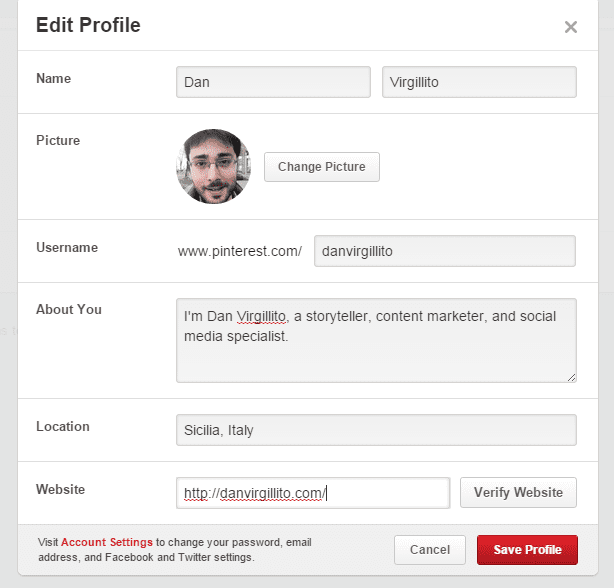
Sign up to Pinterest with your email, Twitter, or Facebook profile. Use your business name as your username, and fill in the rest of the details – company logo, description, and website URL.

For the profile name, you can use your business name + a keyword. So if you’re a coffee shop and your business name is ‘Breco’, use ‘Breco Coffee shop’ as your profile name. Follow the same rule for the ‘About’ section of your page; you can also include a call-to-action such as ‘visit our site for more’. Verify your account so that it appears in search engine results.

Creating a profile on Pinterest

Next, you create boards for the content that’s published on your site. If your site’s content is published in different categories, you can create a board for each category. Name the board after the category to make it easy for followers to filter content according to their interests. In the board description, you can mention keywords and call-to-action.

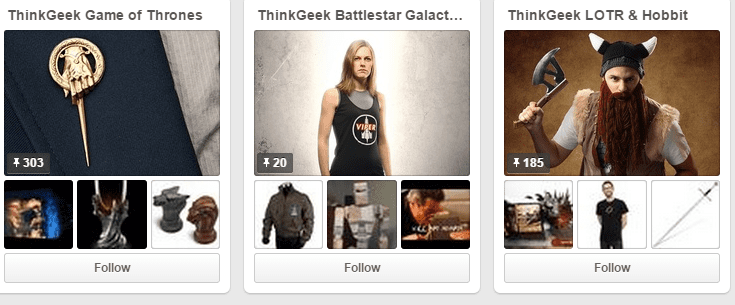
ThinkGeek is a great example of how to name and categorize Pinterest boards.

How to categorize Pinterest boards

Create boards that resonate with your content categories and overall business.


Actionable Ways To Drive Referral Traffic From Pinterest

So how do you make the most out of your presence on Pinterest, and increase referral traffic to your site? Here are a few practical tips to help you drive more traffic:


1. Display the official ‘Pin It’ button on your site

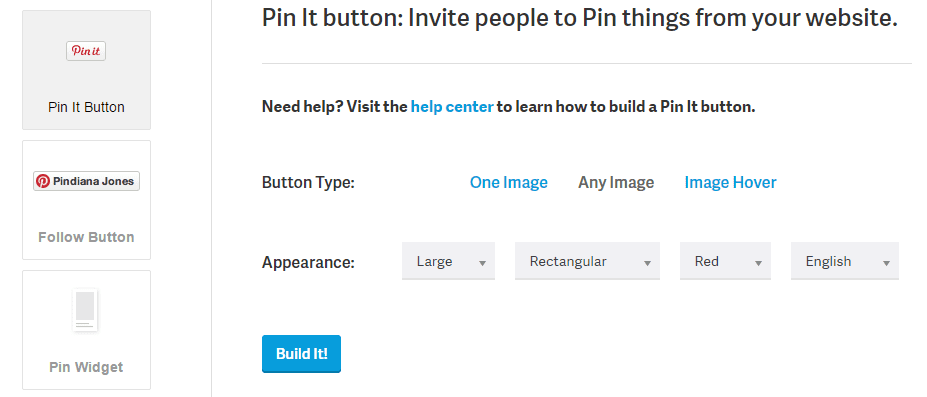
The ‘Pin It’ button will let your site visitors add things from your webpage to their Pinterest accounts. When they do, their followers are likely to see your site’s content as well. You can get the Pin It button from Pinterest by filling out the information. You can select from different Pin It images or even create a custom image.

The Official Pin It Button for websites

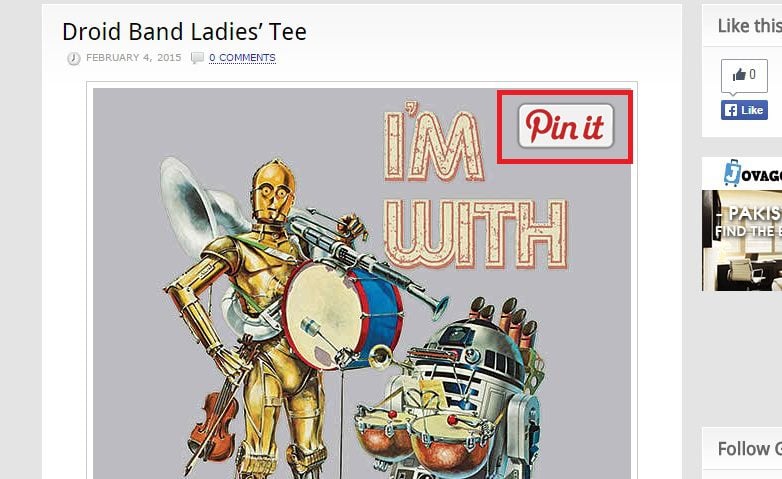
After you generate the code for the widget, add it to your site. Here’s how the ‘Pin It’ button appears on Geekalerts.

Geek alerts displays the Pin It Button on its web pages

The Pin It button will serve as a visual reminder, making it easy for visitors to pin images from your site, which will drive referral traffic from their accounts.

WordPress users can also use the jQuery Pin It Button for images. The plugin is used by popular sites such as SocialMediaExaminer.


2. Optimize your visuals

As Pinterest is all about images, you’ll need to come up with great visuals to entice people on the network. Here’s how you can optimize your visuals to increase their chances of being repined:
  • Pin videos directly on Pinterest
  • Use a watermark on your visuals
  • Use the 2:3 aspect ratio for images (aim for tall than wide)
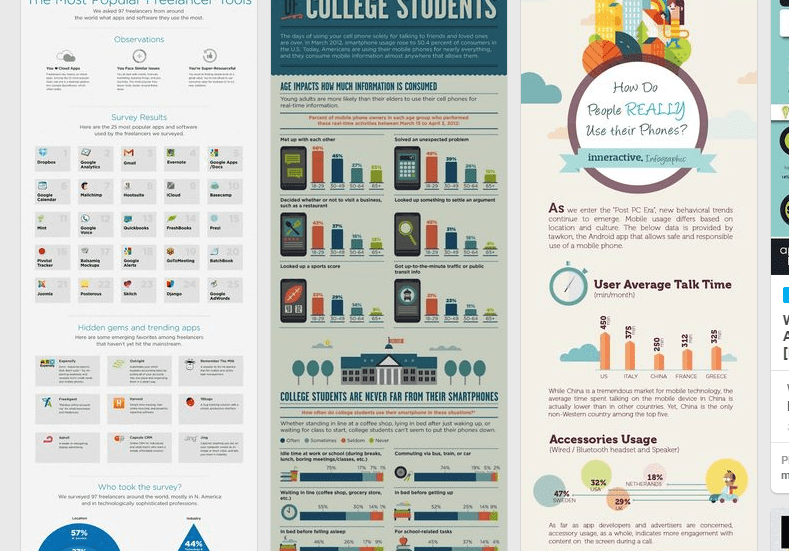
  • Covert multiple images into infographics as long visuals get the most repins and traffic
  • Try not to use real faces. Images without faces receive 23 percent more repins
  • Use a clever mix of pictures, text overlays, and step-by-step instructions to create sharable images. These may also be called ‘how to’ images or ‘tip’ images
  • Use dominant colors in the images
  • Use PicMonkey to optimize the template of your visuals
Facebook advanced marketing expert Jon Loomer shares long-length images on his Pinterest account.

Long length pins get more repins

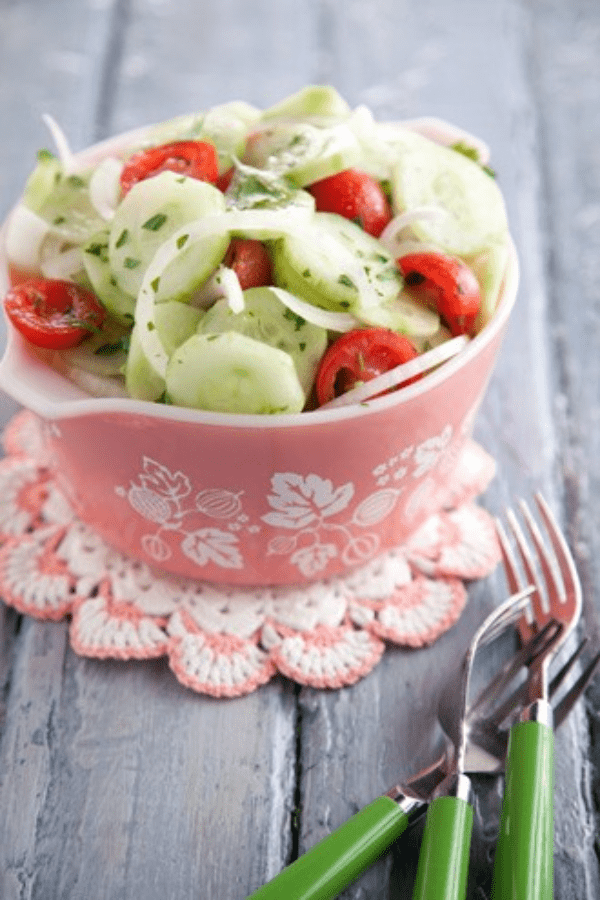
And here’s an example of an image with dominant colors from Paula Deen’s account. This image was repined 307,000 times.

Use dominant colors to optimize Pinterest images

Utilize these tips to create the most sharable images.


3. Include a link to your site in the pin and its description

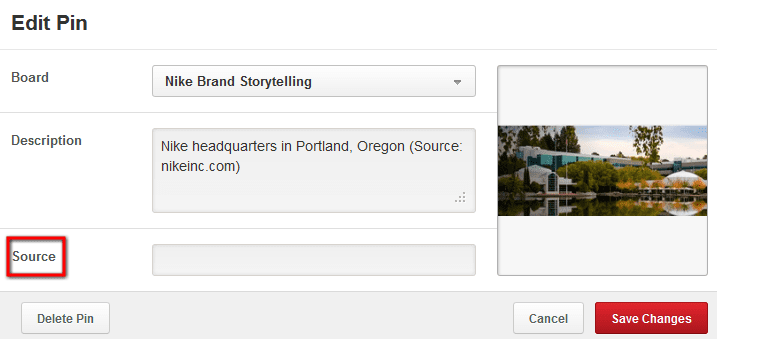
One of Pinterest’s best features is that it gives you the option to relay images back to your website. To redirect an image, you need to edit the pin, and modify its source. Pinterest gives you the option to change the source of any pin you’ve uploaded.

Edit pin source on Pinterest to insert site link

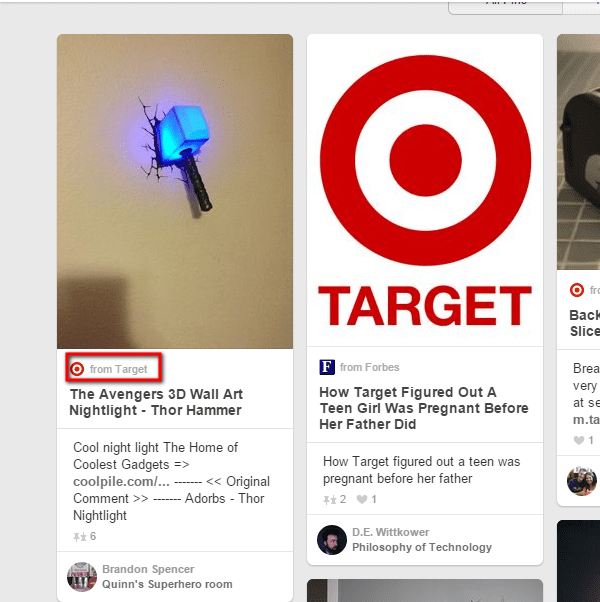
The retail giant Target does this on its images uploaded to Pinterest. When someone on Pinterest clicks on the image, they are redirected to Target’s webpage. Here’s an example of such an image redirecting to Target’s store.

Target includes its site's link in its pins

Similarly, putting your site’s URL in the pin’s description can drive more traffic to your site. This will be helpful in attracting traffic in the form of visitors who are using Pinterest for the first time and may not click a pin twice to go to your site (two clicks are required: the first enlarges a pin, and the second takes a visitor to a website).


4. Engage with followers

To turn Pinterest followers into site visitors, you need to engage with them. You can increase engagement by pinning consistently so that pins appear in the feeds of your followers. If you can’t find time to pin regularly, you can schedule pins with Tailwind or Viral Woot.

You should also check pins and boards of your followers and repin content that’s relevant to your business. It’s also a good strategy to repin content from influencers – it would be a major boost to your Pinterest referral traffic if they return the favor. For instance, Williams Sonoma invited Jennifer Shea, baker and business owner, to create a board for parties and occasions.

Commenting on other pins will also drive engagement, and after you develop some authority, you can also leave a link to your site in the comments section (don’t do it quite often or when you’re just starting out on Pinterest as your effort can be flagged as spam).

Another viable strategy is to check what is being shared on your Pinterest page and pin new content around that theme. Those with a verified business website can check analytics or you can conduct an audit via www.pinterest/com/source/yourdomain.com.

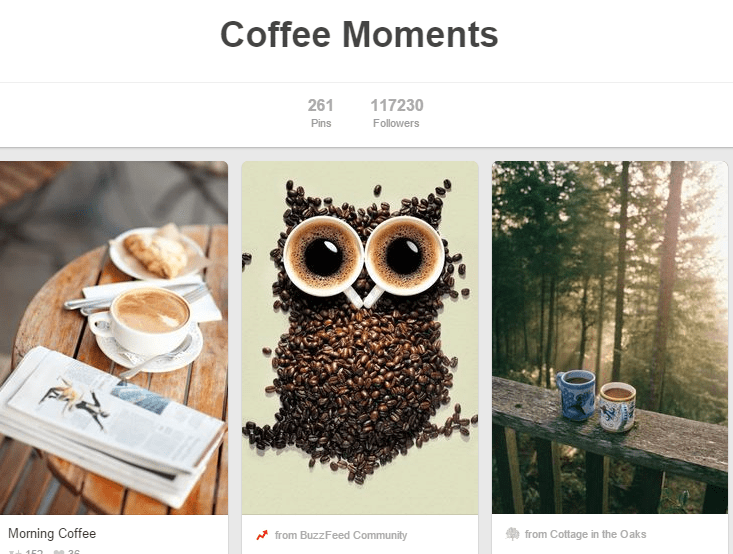
Starbucks does a great job at Pinterest engagement by pinning images related to their coffee items and community. On a board titled ‘Coffee Moments’, they pin pictures of customers enjoying coffee and creative images of coffee.

Starbucks community engagement on Pinterest

Another thing you can do to involve your community is create group boards. These boards can compromise of staff, contributors & followers, and they can be kept open for anyone to join. The contributors to your group boards can become brand ambassadors, promoting your site’s content on your behalf. Lastly, contribute to other boards where you can occasionally post pins that include your site’s link.


5. Host contests

Contests are a convenient way of attracting more engagement, traffic and followers directly to your Pinterest boards and indirectly to your site. Read Pinterest’s guidelines on hosting contests before getting started.

One way of getting Pinterest traffic to come to your site is by engaging visitors with your site-hosted contests. This only requires you to pin the contest in one of your Pinterest boards. But let’s talk about how to host a contest directly on Pinterest.

For instance, you can create a contest board named after your business and ask participants to submit their favorite items directly from your website (so that the URL is included) in that board along with a comment of why they like the item. One or more than one individual with the best comment(s) can be announced the winner.

Additional tips
  • Create a buzz about your contest by promoting it to your email list, other social networks, and website visitors
  • Offer an excellent prize. If you don’t have a big enough budget, you can give away discount coupons or merchandise
  • Mention the date at which the winner will be announced
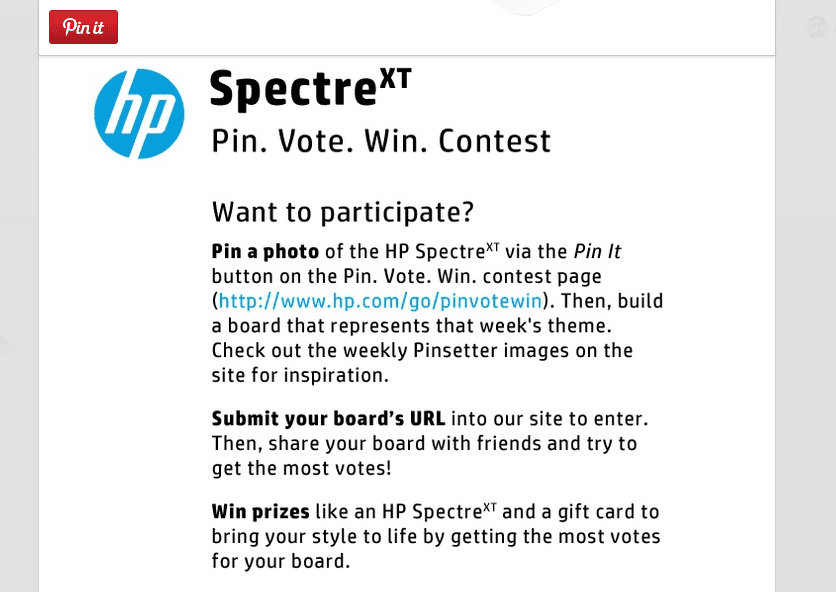
A great contest example is HP SpectreXT Laptop contest on Pinterest. It was engaged with by Pinterest users who were asked to create boards based on weekly themes to win a $500 Amazon gift card or the laptop itself. HP posted a theme on its dedicated web page where participants were asked to create boards based on the theme, as well as a pin featuring the laptop. Users were also required to create a login to submit the URL to the board through the site’s page, and public votes were used to determine the winner each week.

HP Used Pinterest Contest To Drive Traffic To Its Landing Page

The takeaway? HP incorporated a landing page of its website into the contest strategy, which was enough to drive traffic to its site. Participants visited the landing page to learn contest rules, and other people also visited the site to submit their votes.

You can use apps like Wishpond or Gleam.io to organize your contest and promote it on other digital properties you own.


6. Leverage rich pins

Pinterest introduced rich pins to let certain businesses include more details about pinned images and integrate the Pin It button with mobile applications. Pin categories that display more information include: recipes, movies, and products.

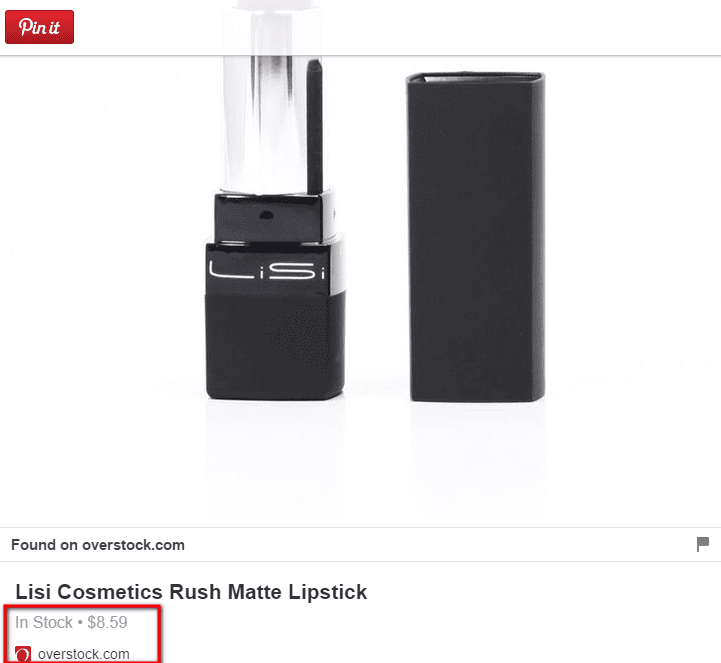
The difference between a regular pin and a rich pin is that the latter shows the pricing and has a direct link to the website’s product page. Regular pins require you to enter the price manually and people are only able to see the link when they hover over the product image.

Rich pins can also be used by business owners who sell items on eBay or Etsy. Pinterest has a detailed page stating how a business can apply for rich pins. The benefits include improved discoverability, better CTR, and increased referral traffic to product pages.

Another standout feature of rich pins is email notifications when the price drops. This is called the ‘real-time pricing feature’ of rich product pins. So if anyone pins a product from your product page, and a week later you drop the price, that user would get an email notification of the price change. This means even if someone is not on your email list, rich pins will drive pinners back to your site.
Several online retailers use rich pins to drive traffic back to their sites. Here is an example from OverStock’s Pinterest page.

Rich Pins drive traffic to product pages


Over to you

I hope these tips give you some inspiration to boost your Pinterest referral traffic. When you implement them, measure the metrics within Pinterest analytics to determine what is working best for you.


To view the original article please visit: http://www.elegantthemes.com/blog/tips-tricks/how-to-drive-massive-referral-traffic-from-pinterest-in-2015
Email ThisBlogThis!Share to XShare to FacebookShare to Pinterest
Posted by One Step Retail Solutions at 12:34 PM
Labels: Engagement, Images, marketing, pinterest, Referral Traffic, retail business, Social Media, Visuals, Website Design
Older Posts Home
Subscribe to: Posts (Atom)


My photo
One Step Retail Solutions
One Step Retail Solutions is the leading retail technology consultancy and POS reseller for the US. Servicing the retail technology needs of retailers since 1985.
View my complete profile

Search This Blog

Follow Us!


Join our Retail Professional Associate Program

Join our Retail Professional Associate Program
The purpose of our Retail Professional Association (RPA) program is to build strong and mutually beneficial relationships with retail service providers.

Blog Archive

  • ▼  2015 (165)
    • ▼  November (19)
      • 12 Tips to Create a Killer Call to Action for Ever...
      • 57% of holiday shoppers have already begun
      • Use Your Website to Boost Brick and Mortar Visits
      • How To Deal With A Bad Salesperson In Your Retail ...
      • We're Moving!!
      • 3 Reasons Why Social Media Influencers Make Powerf...
      • 4 Common Mistakes in Online Customer Service
      • How to Motivate customers to share you products
      • 3 Things You Must Optimize on Your E-Commerce Site
      • Should You Decorate Your Retail Store For The Holi...
      • How To Navigate The Complex Retail Sale And Increa...
      • Making Omnichannel Work: Unifying product, pricing...
      • The Impact of Mobile on the Retail Industry
      • 8 Awesome Black Friday Email Campaigns You Can Ste...
      • 5 Creative Holiday Promotion Ideas for Retailers
      • Quick! What's Your Inventory Turn?
      • Bringing E-Commerce Features to the Storefront
      • The Thrill of the Old
      • Sound solutions for dealing with overstocked seaso...
    • ►  October (30)
    • ►  September (18)
    • ►  August (13)
    • ►  July (14)
    • ►  June (11)
    • ►  May (7)
    • ►  April (11)
    • ►  March (14)
    • ►  February (14)
    • ►  January (14)
  • ►  2014 (42)
    • ►  December (9)
    • ►  November (5)
    • ►  October (7)
    • ►  September (8)
    • ►  August (6)
    • ►  July (5)
    • ►  June (2)
  • ►  2013 (19)
    • ►  September (1)
    • ►  August (1)
    • ►  May (2)
    • ►  April (5)
    • ►  March (3)
    • ►  February (4)
    • ►  January (3)
  • ►  2012 (123)
    • ►  December (8)
    • ►  November (10)
    • ►  October (8)
    • ►  September (8)
    • ►  August (14)
    • ►  July (17)
    • ►  June (18)
    • ►  May (16)
    • ►  April (9)
    • ►  March (11)
    • ►  February (4)
  • ►  2009 (11)
    • ►  March (7)
    • ►  February (3)
    • ►  January (1)
  • ►  2008 (21)
    • ►  December (4)
    • ►  October (2)
    • ►  August (3)
    • ►  July (2)
    • ►  June (2)
    • ►  May (2)
    • ►  April (1)
    • ►  March (1)
    • ►  February (1)
    • ►  January (3)
  • ►  2007 (32)
    • ►  December (2)
    • ►  November (3)
    • ►  October (5)
    • ►  September (3)
    • ►  August (3)
    • ►  July (3)
    • ►  June (2)
    • ►  May (2)
    • ►  April (2)
    • ►  March (1)
    • ►  February (6)

Links:

  • Contact
  • One Step Retail - Product Overview
  • One Step Retail Solutions - Request a Consultation
  • One Step Retail Solutions - Request a Demo
  • Six Biggest Challenges [WHITE PAPER]
OneStepRetailSolutions. Awesome Inc. theme. Powered by Blogger.